Learning the German alphabet is very important because its structure is used in every day conversation. Without it, you will not be able to say words properly even if you know how to write those words. The better you pronounce a letter in a word, the more understood you will be in speaking the German language.
Below is a table showing the German alphabet and how it is pronounced in English, and finally examples of how those letters would sound if you place them in a word.
French is a Romance language spoken by about 265 million people in France, Belgium, Luxembourg, Canada, Switzerland, Italy, the USA, Lebanon, French Guiana, north, west and central Africa, Madagascar, a number of islands in the Indian Ocean, Haiti and other Caribbean islands, Indochina, New Caledonia, the New Hebrides and the French Pacific Territories.
The French language is descended from Latin and first appeared in writing in 842 AD when it was used in the Strasbourg Oaths. Before then Latin was the language used for literature throughout Europe. During the 10th and 11th centuries, French appeared in a number of documents and religious writings, but French literature didn't start to take off until the late 12th / early 13th century. The first great work of French literature was the 'Chanson de Roland' (Song of Roland), which was published in about 1200.
The development of spoken languages is probably the most significant development in communications in the history of the world. Since mankind first developed language, languages have developed into a multitude of varieties, a diversity which endures to this day. Here is a list of the top ten languages, grouped by the number of native speakers.
10. German (over 90 million speakers)
German is a member of the West Germanic language family, alongside English. German is primarily spoken, as its name suggests, in Germany, where it is the official language. However, it is also the official language of Austria, Liechtenstein and Luxembourg, and is one of three official languages of Belgium (alongside Dutch and French) and one of four official languages of Switzerland (alongside French, Italian, and Romansch) and is the official language of Italian province of Bolzano-Bozen. In addition, it is recognized as a minority language in several countires, including Poland, Denmark, Hungary and the Czech Republic.
Common German phrases include Guten tag (Good day), Sprechen sie Deutsch? (Do you speak German?), and auf wiedersehen (Goodbye).
9. Japanese (132 million speakers)
The Japanese language is a member of the Japonic language family (which also includes the Ryukyuan language spoken on the island of Okinawa). Most Japanese native speakers live in Japan and its territories, but native Japanese speakers also live in Korea, the United States and Europe. Japanese is the official language of Japan, and it also enjoys official status in Palau.
Common phrases in Japanese include konichiwa (hello), arigato (Thank you), and sayonara (goodbye).
8. Russian (144 million speakers)
The Russian language is a member of the East Slavic family of languages, a family which also includes the Belarusian, Ukrainian, and Rusyn languages. Most of Russian’s 144 million speakers live in Russia, where it is the official language. Other countries with large Russian-speaking populations include Belarus, Ukraine, and Kazakhstan. Russian is written in the Cyrillic alphabet.
Common Russian phrases include ????????????. (ZDRAHST-vooy-tyeh; hello), ??. (dah: yes), and ???????. (spuh-SEE-buh; thank you).
7. Portuguese (178 million speakers)
The Portuguese language is a member of the Italo-Western branch of the Romance language family. Like the other Romance languages, it is a descendant of Latin (“Romance” referring to Rome). It is the official language of both Portugal and Brazil, where most native speakers live. In addition, it is the official language of Angola, Cape Verde, East Timor, Guinea-Bissau, Mozambique and São Tomé and Príncipe, and is a mandatory subject of study in schools in Uruguay and Argentina. It is currently the fourth most learned language in the world, with 30 million learners.
Common Portuguese phrases include Bom dia (Good day), Como está? (how are you?), and Não (No).
6. Bengali (181 million speakers)
Bengali is a member of the Indo-Aryan language family, alongside languages such as Hindi, Punjabi and Urdu. Most of its speakers live in the country of Bangladesh, where it is the official language. Speakers also live in the Indian states of West Bengal, Tripura and Assam. Speakers also live in Europe, the United States, and even Saudi Arabia. Bengali has a rich literary tradition and is a focal point of Bengali nationalism. Bengali is written in the Bengali script, which is related to the Sanskrit and Hindi scripts.
Common Bengali phrases include Nômoshkar (Hello), Apnar nam ki? (What is your name?), and Ektu (please).
5. Arabic (221 million speakers)
Arabic is a member of the Semitic language family, which includes HebrewNeo-Aramaic languages such as Syriac and Neo-Chaldean. Arabic is most often identified with the Middle East and North Africa, and is the official language of 26 countries. It sits alongside Hebrew as the official language of Israel, and has large populations of speakers in both Europe and North America. Additional, its classical variant is the language of the Qu’ran. Arabic is written in the Arabic script.
Common Arabic phrases include as-salaamu ‘alaikum (Peace be with you, a formal greeting), Na’am (yes), and ismaHli (excuse me).
4. Hindi-Urdu (242 million speakers total)
Hindi-Urdu is a member of the Indo-Aryan family, alongside Bengali. It is a pluricentric language and has two official forms, Standard Hindi and Standard Urdu, although the two forms are nearly indistinguishable from each other. Hindi is the official language of India, whilst Urdu is the official language of Pakistan. Urdu and Hindi are also spoken in parts of Europe and North America with heavy Indian and Pakistani immigrant populations. It is written in both the Hindi alphabet and the Arabic alphabet (for Urdu due to Islamic influence).
3. English (328 Million speakers)
English is a member of the West Germanic language family. It originally sprouted from the Anglo-Saxon language (Old English) and borrowed heavily from Latin and French due to the Norman conquest of England. Though it developed in the British isles, the largest population of English speakers lives in the United States, with about 309 million speakers. English is the official language of 53 countries, includingIreland, Canada, South Africa, Jamaica, and New Zealand, and is the de facto language of the United States, Australia and the United Kingdom. It also has large speaking populations in several African and Oceanian countries, and is a “subsidiary official language” in India.
English is also an official language of several organizations, including the UN, NATO, and the European Union.
2. Spanish (329 million speakers)
Spanish is a member of the West Iberian branch of the Romance languages, closely related to Portuguese. Spanish is one of the most widely distributed languages in the world; it is the official language of over 20 countries, and is the official language of nearly every state in Latin America, excepting Brazil, Belize, etc. Additionally, large populations of native speakers have immigrated to the United States, and Spanish is now one of the most common languages in the American southwest. It is also one of the six official languages of the United Nations.
Common Spanish phrases include hola (hello), Que pase un buen día (Have a good day), and ¿Cómo te llamas? (What is your name?).
1. Mandarin (over 845 million speakers)
Mandarin is often called Chinese by non-speakers, but it is in fact only one of many Chinese languages, which include Cantonese and Xiang, in the Sino-Tibetan language family. Mandarin is the largest of the Chinese languages, and is the official language of the People’s Republic of China and Taiwan. It is also one of four official languages of Singapore (the others being English, Malay and Tamil). In addition, large scale immigration from both mainland China and Taiwan have brought large populations of Mandarin speakers to the United States and Europe. Mandarin has two writing systems; Traditional Chinese and Simplified Chinese.
Common Mandarin phrases include N? h?o! (Hello!), W? míngzi jiào… (My name is…), and Hu?nyíng! (You’re welcome!)
Hi friends, In this post we will learn how to insert Facebook like button in every Google Blogger Blog posts at the beginning and at the end. Social networks have been playing an important role in Blogging for driving traffic. Facebook is one the most liked social network among all the Internet users. Facebook enables you to create a Fan page and share your content on it. When a person like your facebook fanpage, he/she subscribe to your content on Facebook. He / She will be getting updates from your fan page about your Blog and they will visit you. Indeed it is an important source of referral traffic. We all know the importance of traffic for Rankings.
Wordpress has many built-in plug-in that enables this feature easily. But Google Blogger users have to do this manually by editing their blog's template. It is not a difficult task and if you know a little bit of HTML/XML then it takes a few minutes. You need to follow these steps in order to make it happen:
First of all, I recommend you to take backup of your current template so that you can avoid any loss.
For backup, go to your Blogger dashboard. Click on template and then Backup/Restore on top-right side. Click on download full template and save it to your computer.
Now that you have taken the back up, it is time to choose a Facebook button. VisitFacebook Developers page, it will show like the one below:
Enter the Facebook page URL and customize your like button style.
If you don’t want the send button to appear with the like button, uncheck the send button from above form.
When you are done with the customization, you need to click on get code. It would pop-up a window like this one:
Now copy the code shown above, it is the JavaScript code you need to put in the <body></body> tag. Press CTRL+F to find <body> and paste this code just below it.
Update: Those who are unable to find the body tag like <body>, they should try to find it like this <body
Now copy the second code, if you want to put Facebook like button at the end of every post you need to find this code first <data:post.body/>, if it is more than once try finding the last one.
Just after the last <data:post.body/> put the code you copied from Facebook developer page.
Click on preview and make sure that everything is fine before saving.
Now click on Save Template and view any post. You will find Facebook like at the end of every post.
If you want to put the like button in the beginning of every post you need to follow the same procedure but put the second code after this line
<div class='post-body entry-content' expr:id='"post-body-" + data:post.id' itemprop='articleBody'> instead of <data:post.body/>. You can use both of them as well for displaying it in the beginning and ending of your Article.
You just inserted Facebook like button in your blogger blog posts. If you face any problem, you can comment here.
Lots of people have been asking me about RSS feeds and Feedburner over the past few weeks.
So I’ve decided it’s time to update my ‘how to’ Feedburner info so that:
All the required instructions are in one post
It is current for the latest version of Edublogs and Feedburner
What is RSS?
The easiest way to receive latest posts from your favorite blogs is to subscribe to RSS using feed readers such as Google Reader, Bloglines, NetVibes.
RSS (means Really Simple Syndication) retrieves the latest content from the sites you are interested and pulls them into your feed reader where you can read them all in one location rather than visiting each site separately.
The presence of the orange RSS icon indicates a site has an RSS feed and means you can subscribe to it using a feed reader.
What is FeedBurner?
Most blogs have RSS feed which is detected automatically by commonly used feed readers when the blog URL is added to the reader.
However, if you want to make it more obvious and easier for readers to subscribe using RSS, or want to know exactly how many people subscribe to your blog then the best option is to add a Feedburner RSS feed and email subscription to your blog.
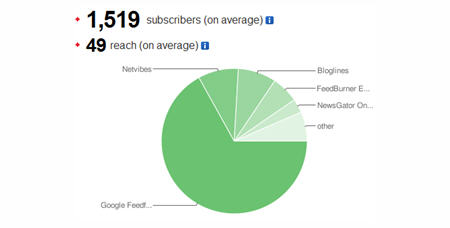
Feedburner is a free web service which enhances bloggers and podcasters ability to manage their RSS feeds and track usage of their subscribers.
Setting Up Your Feedburner Feed
1. Go to Feedburner and sign in to Feedburner with your Google Account (create a Google Account first if you don’t have one!).
2. Add your Blog URL to the Burn a Feed Right This Instant and click Next.
3. Leave RSS 2.0 source selected and click Next.
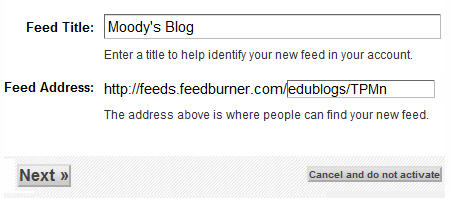
4. On “Welcome” page, make sure you are happy with the title and FeedBurner address (URI) of your new feed and then click Next.
5. On the Congrats! page click Next
6. On the stats configuration page select Clickthroughs and I want more! and then clickNext.
Adding Your Feedburner Feed To Your Blog
This is used to add the RSS icon and easy subscribe options to your blog side bar using a text widget as explained below:
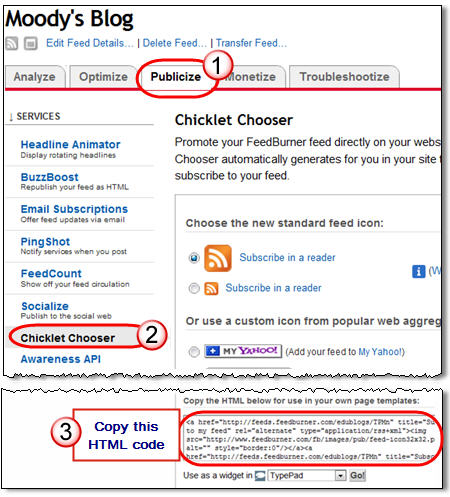
1. Click on the Publicize Tab > Chicklet Chooser in your Feedburner account and copy the HTML code.
2. Go to Appearance > Widgets in your blog dashboard
3. Click on the desired Sidebar to expand (so you can add the widgets) Please note: In new blogs sidebars in your dashboard are empty and adding widgets automatically removes the default Edublogs widgets
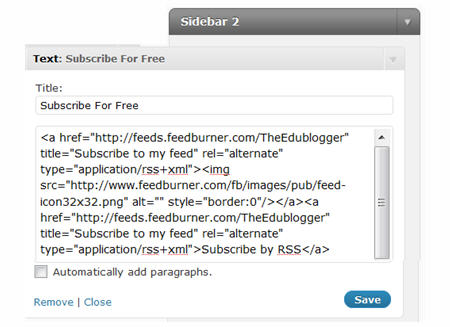
4. Add a text widget to the desired sidebar by dragging it from the Available Widgets into the Sidebar area on the right.
5. The widget will automatically open — just add the HTML code from FeedBurner, click Saveand then Close.
Adding a FeedBurner Email Subscription
It’s important to add an email subscription option to your blog sidebar as some readers prefer to receive latest posts from blogs using email subscription.
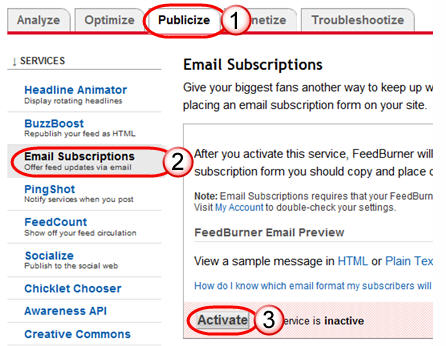
1. Click on the Publicize Tab > Email Subscription in your Feedburner account and click onActivate.
2. Copy the HTML code.
3. Go to Appearance > Widgets in your blog dashboard
4. Click on the desired Sidebar to expand (so you can add the widgets)
5. Add a text widget to the desired sidebar by dragging it from the Available Widgets into the Sidebar area on the right.
6. The widget will automatically open — just add the HTML code for Feedburner email subscription, click Save and then Close.
7. Now readers simply enter their email address and then click on “Subscribe” and Feedburner emails your entire post to them on the day after it has been published on your blog.
Redirecting All Your Blog Feed To Feedburner
Unless you redirect all your blog feed to Feedburner you won’t get accurate subscriber numbers because some of your readers subscribe using your original blog feed.
If you’re an Edublogs supporter you can redirect your blog feed as follows:
1. Go to Settings > Feedburner in your blog dashboard
2. Add your Feedburner address and click Save Changes.
3. Now all your feeds is automatically redirected through FeedBurner and you’ll be able to track subscriber numbers accurately.