Showing posts with label wordpress. Show all posts

Sunday, June 30, 2013

How to Create Adsense account?- Easy Way

In this post, we will see how you can create adsense account for your Website. There are many Adsense alternatives, but no matter what network you try Adsense is certainly the best. Though, if you are good with marketing, you can look into Affiliate marketing and my post on Affiliate or Adsense will give you my personal insight.


I remember when I started Blogging, Adsense was something an alien word for me. While signing up for Adsense, I had very less idea about it, which I learned by myself online. For beginners, who are not aware of Adsense:  It’s  an advertisement program for publisher started by Google. They place contextual ads on your blog and you will get paid when someone clicks on ads.
Here I’m compiling a basic guide for beginners who are not sure of, how to apply for  Adsense.
Create Adsense account
There are few requirements which you need to follow before you can apply for Adsense. You need to have a website. You should be above 18+, else apply using your parents name.

Steps to create Adsense account:

Adsense has changed the account approval process lately and here is new adsense account approval process:
  • Sign up for Adsense
  • Add Adsense ads into your Blog
  • Your account will be reviewed and rejected.
  • Though new adsense account approval process is quite lengthy and now it’s 2 way adsense account approval process, but it will help us to maintain the quality of adsense. Also before applying for adsense make sure your website is following adsense policies.

I believe, by now you have done your research on the above and here is how  you can sign up for Adsense.

Step by Step guide to Create Adsense account

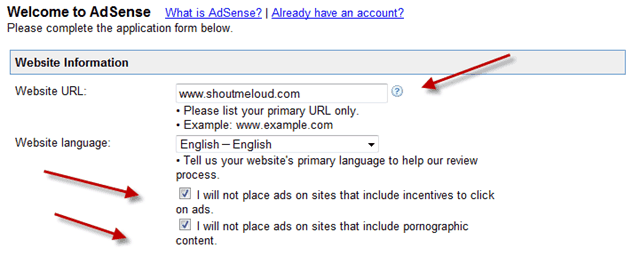
Website details:
Website-details

Add your website details, language and put a tick mark on first two box which says

  • I will not place ads on sites that include incentives to click on ads.
  • I will not place ads on sites that include pornographic content.
In Website URL, it should be your blog address and make sure to add it without http://

Adsense contact information:
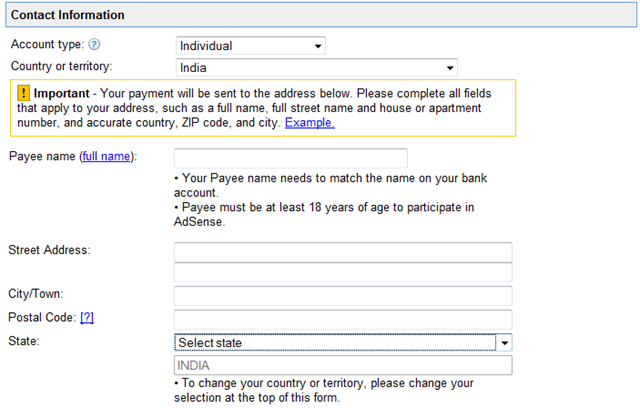
adsense-contact-information

This is most important part and I remember making couple of mistakes while signing up. Most important is Payee name. Make sure to use the same name under which you have a bank account. As Adsense will be sending you a check under that name. If you make a mistake here, changing payee name of your account would be difficult.

Rest add your contact information and fill other details.

Accept Adsense policies:

adsense-policies

Read Adsense policies and put a tick mark in front of all three boxes.
Once done click on Submit and on the next page, you can review your details. Make sure that all the details are accurate and up to date.

Signing up Email:
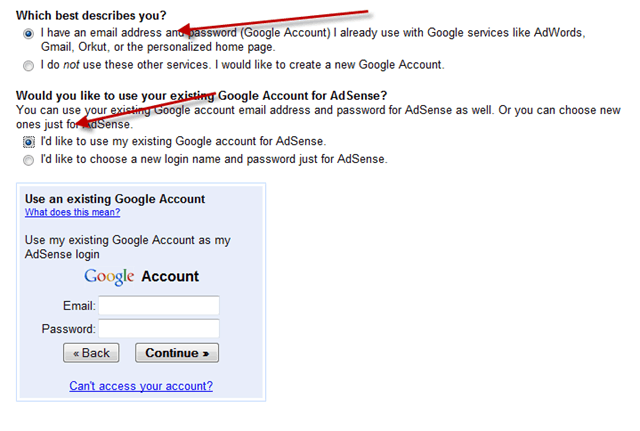
Adsense-Email-address

You can use your current Email address to sign up or you can create a new Gmail id for Adsense. For fast approval, I would suggest you to sign up using your Google apps address. i.e admin@domain.com.

In my case, While I tried signing up using generic @gmail address, I was rejected 4 times, but later on when I applied using domain Email address, it worked and I got Instant adsense approval.

Submit Adsense Tax Information

Once you have signed up for Adsense, you need to add adsense codes into your blog. Adsense team will review your application again after adding the ad codes, and it will activate and will send you Adsense Pin. Which takes 1-2 months depending upon geographical position.
So, after every thing is set up, in order to get paid from Adsense, you need to fill two information:
  • Please submit your Tax information
  • Please Enter your Pin
You will also need to submit Tax form, depending how you are entitled to do business.

Indian Publisher Tax Info Adsense
Similarly, once you receive the Pin, add it into your Adsense account and from the next month payment cycle, you will start getting paid. Minimum Payout for Adsense is $100.


I hope this guide will help you to create Adsense account
Leave your comments below.

Check Out: Top 10 Abandoned Places On The Earth

Monday, June 3, 2013

Blogger or WordPress: Who’s The True Winner?

There have been always a debate on this matter.
Which is better, Blogger or WordPress.org?
The question is still unanswerable because WordPress blogs are increasing and so as the blogspot blogs.


Both are top platforms and are developing and advancing day by day…
  • WordPress fixes their bugs in every new version and blogger adds new features occasionally. Sometime ago WordPress was updated to version 3.5 and this made their blogs more secure and customizable.
  • Again, Blogger added features like robots.txt, meta description, no-follow and no-index commands etc.. to optimize blogs for search engines.
Development is going on and growth is on its way. It’s not that a blogger can make good revenue with only WordPress, as many are making good money from blogger too..
What I think is…
Success don’t depend on the platform you choose but on what you do.
Your earning depends only on your works, your writing and hard work. Wherever you’re working, work hard with originality and success is for sure.
Still, to get a clear picture of the two platforms I’ll provide the newbies with some points showing the difference between Blogger & WordPress, so that they can select anyone of them.
Points About Blogger.
1. Easy to understand and work with, especially for newbie bloggers.
2. Provides a gadgets/plugins store but you can’t get all what you want without going for a search in sites like bloggerplugins. They have a good collection of plugins for blogger blogs.
3. Provides cool templates as well as awesome dynamic views, but for more templates explore sites like splashytemplates or bloggerthemes.
4. Fast to work even in slow net speed like GPRS and low bandwidth dial-up.
5. Unless you know the other bloggers personally you can’t allow them to blog on yours as Blogger don’t has a guest blogging feature.
6. Blogger requires less investment and less technical knowledge as it doesn’t require any hosting. You don’t need to spent money for hosting, you just need to buy a domain name from sites like GoDaddy and pay a very less amount yearly.
7. If you need to change your blog template in blogger, then all your previously made customizations and hacks/coding with the template ‘ll get removed.
8. Blogger is a secured platform and thus the blogspot blogs are rarely hacked.
Points about WordPress.
1. A little time is needed to get adjust with WordPress.
2. Has a huge plugins store with every need.You just need to search for what you want.
3. Provide a great range of free templates in the templates store but don’t provide dynamic views.
4. WordPress requires a certain net speed to work with.You can’t operate it nicely in slow speed.
5. You can make your blog a guest blog so that other bloggers can come and write on yours.
6. Self hosted WordPress blogs require more investment & technical efforts as they require hosting facilities. So you need to spent money for hosting on sites like HostGator, every month or every year.
7. Your template customizations and coding can be backed up, so that when you switch to a new template you don’t require to work once again on ‘em.
8. WordPress is also a safe platform but the no. of hacking reports are more here. You need to take some security measures to save your blog from hackers.
I’ve not mentioned the threaded comments point as it is available in both the platforms now. I’ve also not mentioned much about SEO because both the platforms work well in Search Engines. It all depends on your link building and keyword research works. And I’ve not talked about Adsense integration as well, that is also easy in both. Blogger has Adsense options in dashboard and in WP you can install plugins like “Easy Adsense Lite” or” Quick Adsense” to do the work easily…
Finally I want to say that, you don’t need to think much about platform because if you’re correct then everything is. Just go on with white-hat techniques, don’t take help from cheap and link-buying programs, work on how to get natural linking (e.g: from guest blogs & article directories) and enjoy your blogging journey..
Hope the post helped you to make a good decision. If you liked my it then do share and comment below about the platform you would select.