Showing posts with label adsense. Show all posts

Thursday, July 4, 2013

Top 10 Blogs To Make You A Better Blogger-Must Read To Become a Blogging Icon

For every naive blogger or a master blogger it's always good to evolve by reading other blogs. No one can say they are a master blogger. Blogging is a place which evolves everyday. But, the following blogs have become like the silver bullets of hallmark of success. So, let's check who are these top 10 blogs which can help you achieve the zenith in blogging.


1. ProBlogger – Started by Darren Rowse in 2004, this top site offers advice on creating a successful blog, including blog design, writing content and SEO. The site also hosts a forum, workbooks and a jobs board for bloggers.
2. Copyblogger – Everything you need to know about creating content, copywriting, SEO and internet marketing. Check out their e-books, seminars and webinars.
3. Bloggingtips.com – This site aims to be a community for bloggers, writers and readers to connect. The team of writers offers blogging advice, guides and resources.
4. DailyBlogTips – Covers blogging basics, design, SEO and internet marketing. Check out useful sister site, DailyWritingTips for daily tips on grammar, spelling, punctuation and vocabulary. This is one of my favorite sites.
5. Basic Blog Tips – Ileane offers blogging tutorials, including podcasts and scores of YouTube videos.


6. For Bloggers by Bloggers – A roster of top, passionate bloggers offers advice on how to create, sustain and grow a blog.
7. Michelle Shaeffer – Michelle shares her experience – both good and bad – as a successful blogger. Her tag line, Building your visibility, voice and community online, says it all.
8. WPBeginner – If you’re using WordPress as the platform for your blog, this is a great resource. The blog provides tips, tricks, hacks, and other resources for the WordPress community. Check out bobwpand Lorelle on WordPress, also.
9. Moz.com – If you want to go beyond the basic WordPress installation and get advice on how to super-optimize your blog, check out Moz (formerly, SEOMoz).
10. Legal Bloggers – Though they occasionally offer blogging tips, this is less about that and more about lawyers blogging with passion. Three of my favorites are legal blogging veterans Kevin O’Keefe (Real Lawyers Have Blogs), Carolyn Elefant (MyShingle) and Lee Rosen (Divorce Discourse – don’t let the title fool you – this blog is all about practical, insightful advice on running and growing a law practice).
RELATED POSTS:
Check Out: Insert Facebook Like Button In Every Blogger Post

Please leave your comments below.


Sunday, June 30, 2013

How to Create Adsense account?- Easy Way

In this post, we will see how you can create adsense account for your Website. There are many Adsense alternatives, but no matter what network you try Adsense is certainly the best. Though, if you are good with marketing, you can look into Affiliate marketing and my post on Affiliate or Adsense will give you my personal insight.


I remember when I started Blogging, Adsense was something an alien word for me. While signing up for Adsense, I had very less idea about it, which I learned by myself online. For beginners, who are not aware of Adsense:  It’s  an advertisement program for publisher started by Google. They place contextual ads on your blog and you will get paid when someone clicks on ads.
Here I’m compiling a basic guide for beginners who are not sure of, how to apply for  Adsense.
Create Adsense account
There are few requirements which you need to follow before you can apply for Adsense. You need to have a website. You should be above 18+, else apply using your parents name.

Steps to create Adsense account:

Adsense has changed the account approval process lately and here is new adsense account approval process:
  • Sign up for Adsense
  • Add Adsense ads into your Blog
  • Your account will be reviewed and rejected.
  • Though new adsense account approval process is quite lengthy and now it’s 2 way adsense account approval process, but it will help us to maintain the quality of adsense. Also before applying for adsense make sure your website is following adsense policies.

I believe, by now you have done your research on the above and here is how  you can sign up for Adsense.

Step by Step guide to Create Adsense account

Website details:
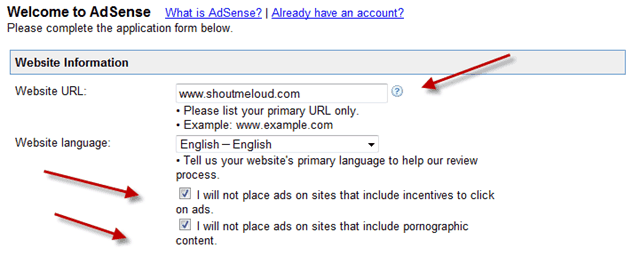
Website-details

Add your website details, language and put a tick mark on first two box which says

  • I will not place ads on sites that include incentives to click on ads.
  • I will not place ads on sites that include pornographic content.
In Website URL, it should be your blog address and make sure to add it without http://

Adsense contact information:
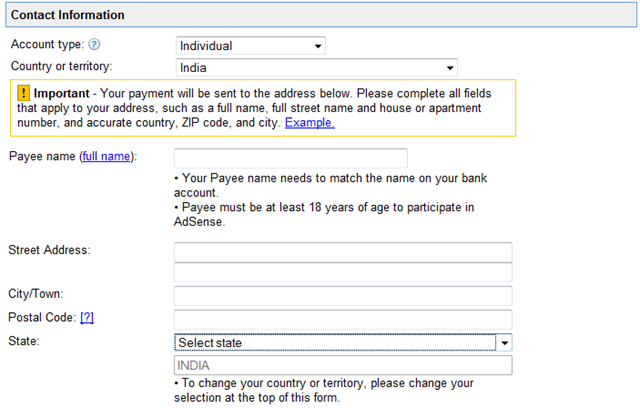
adsense-contact-information

This is most important part and I remember making couple of mistakes while signing up. Most important is Payee name. Make sure to use the same name under which you have a bank account. As Adsense will be sending you a check under that name. If you make a mistake here, changing payee name of your account would be difficult.

Rest add your contact information and fill other details.

Accept Adsense policies:
adsense-policies

Read Adsense policies and put a tick mark in front of all three boxes.
Once done click on Submit and on the next page, you can review your details. Make sure that all the details are accurate and up to date.

Signing up Email:
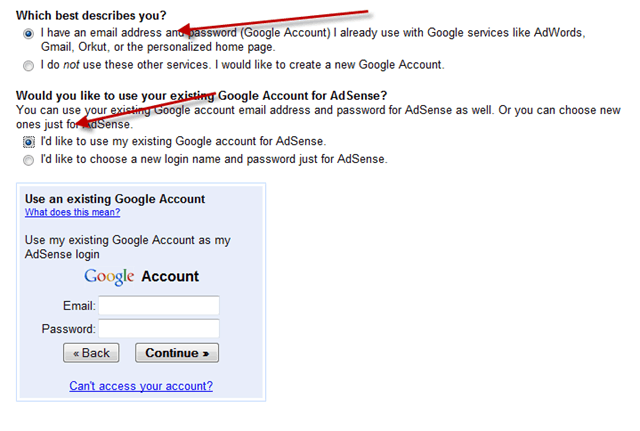
Adsense-Email-address

You can use your current Email address to sign up or you can create a new Gmail id for Adsense. For fast approval, I would suggest you to sign up using your Google apps address. i.e admin@domain.com.

In my case, While I tried signing up using generic @gmail address, I was rejected 4 times, but later on when I applied using domain Email address, it worked and I got Instant adsense approval.

Submit Adsense Tax Information

Once you have signed up for Adsense, you need to add adsense codes into your blog. Adsense team will review your application again after adding the ad codes, and it will activate and will send you Adsense Pin. Which takes 1-2 months depending upon geographical position.
So, after every thing is set up, in order to get paid from Adsense, you need to fill two information:
  • Please submit your Tax information
  • Please Enter your Pin
You will also need to submit Tax form, depending how you are entitled to do business.

Indian Publisher Tax Info Adsense
Similarly, once you receive the Pin, add it into your Adsense account and from the next month payment cycle, you will start getting paid. Minimum Payout for Adsense is $100.


I hope this guide will help you to create Adsense account
Leave your comments below.

Check Out: Top 10 Abandoned Places On The Earth

Friday, March 8, 2013

How to Increase Google AdSense Revenue

One of the best ways to earn money online is by using Google AdSense. If you are a blogger and your blogging/web software allows you to copy and paste HTML code, then you can implement Google AdSense. In this way you can earn extra income from your blogging hobby whether it is a part-time or full-time endeavor. This two-part article will help you maximize your AdSense income.


The most obvious problem faced by Google AdSense publishers is low AdSense revenue/income. How much you consider to be "low" depends on your expectations or target. Since one is not allowed to share or divulge detailed Google AdSense statistics with other person (see item seven in Google AdSense terms and conditions), we can only talk here about estimates, not actual data coming from a Google AdSense report.
As I mentioned in the introduction, this article is a two-part series that will hopefully increase your Google AdSense blogging income if you follow the techniques, methods and principles discussed here.

Setting Expectations and Assessing Situations

It is not a good blogging objective to earn a massive amount of Google AdSense income. In that situation, your blog is NOT a content-based blog; rather, it’s more of an affiliate blog which can be classified as "spam" in an extreme case. You may have seen such blogs, which have only a few words per blog post, but are cluttered with ads, or have content that is copied from other sources and then have Google ads placed throughout.
Of course, since you are also aiming for blog authority, search engine rankings and online popularity, you as a blogger should continually be writing great content and posting it on a periodic basis as a means of providing information to help visitors looking for content.
Google AdSense should NOT be the only reason you blog. If it is, you lack the motivation to continue blogging if your AdSense income falls below your expectations. Sadly, most of the time, you have no control over this.
In fact, it can be true that if your website is VERY good, you will have a low click through rate (CTR) for your Google AdSense banners, which can result in low AdSense income. Why? When visitors come to your website, they are looking for information. When they find your content sufficient, good and satisfactory, they will not need to look around your website and click Google ads.
What should you do for income in a case like this? Consider offering some services for a fee, or enable visitors to make a Pay Pal Donation (add a "thank you" button). Lots of visitors may be willing to donate some money for your good content.

The best way to set expectations of how much income you can get from Google AdSense is to look at it like a long-term investment. Do not listen to stories of million dollars Google AdSense checks or those websites that say they are earning more than a thousand bucks in daily AdSense income and claiming that they achieved these figures in a short period of time. This kind of get-rich-quick scheme will never work in the long term.
This case is analogous to betting on a lottery, and leads you to the wrong mindset for setting realistic Google AdSense goals.
Instead, set expectations based on what your website can currently do (your content, niche, visitors) and what you are able to do (based on current time and commitment, skills, marketing techniques). Even aiming for daily amount of $ 0.85 is NOT low at all if you have great content and an authoritative website. Looking at this number in the long term, if that is your daily average:
$0.85 x 365 = $310.25
That is already higher than what your "NORMAL" bank savings account earns every year.
Here is an important tip: use keywords with SEARCHES in your post title tag. This first step is the most important.


Lack of knowledge of what keywords to target can be the root cause of low search engine traffic (which can account for 60% of all of your website’s traffic sources). Low search engine traffic can certainly affect Google AdSense clicks.
The above article link provides all of the tips and techniques you need to tackle researching the best keyword to target for your main blog page or important pages.

Once you have decided on the best keywords to target, the easy way to directly implement it with some SEO benefits is to use those keywords in your post title tag. For example, say you have decided to target "How to write a suspense novel." You can write the title tag like this: "How to write a suspense novel – rare tips and techniques"
Put the most important keyword first, and make your title tag as descriptive as possible. For me, the most effective way to target keywords is arranging them from the most difficult/broader key word for your home page all the way down to the ones with low estimated searches (the least competitive keywords) as the ones you will be targeting for your daily or weekly blog posts.
For example, say I am running a PHP development website that focuses on customization of templates and layouts. Then I will use the higher traffic (broader) keyword as the main keyword to be targeted on the blog’s front page, while I use the keywords with lesser searches as the targets for blog posts.
Below is a sample screen shot that shows a rough glimpse of the blog structure. It includes the front page and blog post title tags:

The bold keywords are targeted keywords researched using the process above. The italic supporting words are there to make the title tag more descriptive and meaningful.
Bear in mind that since the main page/front page has most of the inbound links coming from other domains (most of the time), the broader/more difficult keyword will be targeted to this page. Also, blog posts should support the main theme of the website.
Why is this technique important? As soon as you have a lot of blog posts, Google crawls and indexes those URLs. According to the relevance of the keywords in title tags and your content, the search engine will return your deep blog posts in its results, thus contributing to an increase in website traffic, which in turn can increase your AdSense income.

The easy way to research keyword ideas for your blog posts is:
Step 1: Go to https://adwords.google.com/select/KeywordToolExternal
Step 2: Set results tailored to "All Countries and Territories."
Step 3: Under "Enter one keyword or phrase per line," try entering your favorite keyword ideas at that moment. If you have a blog about playing Counterstike Source, then you might start with "Counterstrike console commands" if you are thinking of writing a blog post about the game’s console commands.
Step 4: Uncheck "Use synonyms." This will let Google’s keyword tool give you direct and related keywords pertaining to your query. After that, click "Get keyword ideas."
Step 5: Under match type, change from "Broad" to "Exact." This will give you a more accurate estimate.
Step 6: You can even click the link "Global Monthly Search Volume" to sort from highest to lowest keyword traffic.
Bingo! The targeted keyword idea has some traffic associated with it (and it is not competitive, since search volume is below 300~500), so you can write a blog post about it and use a descriptive title tag. For example, you might try "Counterstrike Console Commands: Complete List (Updated)"

The rule of thumb is that you need to maximize the potential of every blog post you make if you need to increase your Google AdSense income. One of the effective ways to do this is by researching keyword ideas in advance, before you write a blog post. This will ensure that your blog post attracts long tail traffic from search engines, which will not only help your AdSense effort, but also improve the SEO aspect of your website.

I hope this will help you understand various factors which affect your adsense earnings. The best tip is "try yourself and find which thing works for you best".

If you have any suggestions and doubts, please do comment below. 

Increase Google Adsense Income with Simple Tweaks

As an experienced Adsense publisher, you know tons of Adsense Optimization tricks that will yeild maximum advertising revenue.


To quickly recap, you know by heart that wide rectangles perform better than banner formats, that Google Ad colors should blend with page background color, that section targeting serves more relevant ads, that border-less Ads convert best, that split testing helps you shortlist the best ad formats, that Google CSE is much better than Adsense for Search.. the list goes on and on.

But what’s the next step when you have experimented with all these Adsense tweaks but the CTRs and eCPM figures are stationary or aren’t moving north as you would like them to? Well, the simple solution is – some more optimization.

1. Turn Low Performing Units into Image Only Ads

Say you have a skyscraper in your sidebar or a leaderboard at the bottom of the page. It may exhibit a very poor CTR because it’s so out of sight and visitors often tend to miss the ad unit completely.

In that case, an alternative is to use Image Only Ads for that using – Image ads are generally CPM ads so you will generate revenue each time the ad makes an impression. Image ads are also effective in places where the visitors are Adsense publishers themselves and less likely to be interested in clicking your ads.

Use Google Adsense Sandbox to see image and Flash ads that are likely to appear on your web pages for visitors from different countries across the world.

2. Harness the Comments Section of Your Blog

When people read a blog, they’ll will first read / scan the main article and then they’ll jump to the comments section.

If they have a question or need more information about the product / service mentioned in the blog post, they’ll either leave a comment or will leave the site search for more resources.

That’s why an ad unit placed in the comment section would immensely help. The visitor is in a mood to search for extra information and the Adsense unit in the comments could have an ad for a product that might appeal to the visitor. The best place for place an ad unit their is immediately under the comment textarea box.

3. Don’t Use Adsense At All

Some Adsense publishers are shy of placing ads in prominent and visible locations on their site thinking that that ads might turn away visitors. So they will put ads in some corner hoping that visitors will still find them.

Think from the perspective of Adwords advertisers who are renting space on your blog with the hope of getting prospective customers. Why would they be willing to invest in your site (by buying ads) when they are not getting the expected returns. If you want advertisers to bid on your site, it is advisable that you place ads above the page fold else don’t use Adsene at all.

4. Sell Your Website to Adsense Advertisers using Channels

You can use Adsense channels to convince potential advertisers as to why they should advertise on your site.
When you create a custom channel in Adsense, edit the channel settings and allow Targeting. Then type a marketing pitch – tell your advertisers about your site, where the ads will appear and why should they advertise on your site. Believe me, this works.

5. When Nothing Works, Put One at the Top

Thanks to tabbed browsers like Firefox, IE or Opera – a horizontal ad unit placed at the top of your web page can perform quite well because visitors often notice the areas near the browser tabs.

Whether they are planning to exit your web page by pushing the close button of the current tab or cycling to another browser tab, chances are high that your ad near the tab bar will get noticed. See implementations at Statcounter and Digital Point forums.

6. Avoid Using Common Blog Words

As far as possible, do not use the common jargon like “feeds”, “RSS”, “blog”, “XML”, etc as that might result in RSS and blog related ads even when your website belongs to a different niche.

You can again use section targeting to suggest Adsense bots to ignore the blocks of text that have irrelevant words.

So, this was our suggestions on increasing your Google Adsense Income. If you have any doubts or suggestions, please do leave your comment below.

10 Tips to Increase Google Adsense Revenue

There is always scope to improve your Google Adsense Revenue and one good change can easily increase your adsense income by 33% to 100%.

Tips to Increase Google Adsense Revenue (As suggested by Google Itself):


1. Opt for text & image ads.
according to google, this will lead to large ad inventory for your site
and google can select the best text or image ad suitable for your webpage.


2. In google webinar for AdSense publishers it was suggested that:
a) the middle, above the fold location performs best for ads. (try 300*250)
b) if you usually write long articles then the bottom of article is a good place to show ad.
try 300*250 as (text + image ad) or try 336 *280 as text only ad
  Note: Apart from this, if you want to show ad at the top of website then i suggest try 728 * 90
             leader board.

3. Consider Your Content When Adding New Adsense Units
be creative and aesthetic while adding ads in your site.
the ads should merge with your content and should not spoil the user experience.

4. Opt-in to Placement Targeting
Placement targeting allows AdWords advertisers to choose specific ad placements in your site
and most probably, you will get more revenue per click.
still confused?


5. Use Link Units on Pages with 3 Adsense units in a page.
(these link units give some extra revenue but not always suit in every website design)

6. Display Google Search Box at a very prominent place in your website.
the best place to display search box is top left corner of page.
you can display maximum 2 google search box in a page.

7. Create Custom Channels for your google adsense units
so that you can track the performance of your google adsense units
and optimize the adsense units which are not performing well.

8. Use the best performing google adsense units
e.g. 728 * 90 (Leaderboard), 160 * 600 (Wide Skyscraper) and 300 * 250 (Medium Rectangle)
as a thumb rule, wider google ads perform better.
(i suggest consider 336 * 280 ad for “text only” ads.
otherwise use 300 * 250 ad for “text & image” ads.)

Other Tips to increase Google Adsense revenue
1. Don’t blindly implement Google suggested tips on adsense.
e.g. most of the time 728 * 90 is a better performing adsense unit than 468 * 60 ad unit.
but in certain webpage layouts 468 * 60 might work better than 728 * 90 ad unit.
so basically one has to use his mind to see which ad unit is more suitable in my website.

2. Study the Heat map and consider using Crazy egg tool to know the best ad location in your website.
basically, you have try different layouts for few months and find out which website layout and google adsense units gives best performance. frankly speaking, you have to experiment to find what suits your site.

3. more traffic means more click.
so post good content and give better user experience on your site.
don’t place the ads in such a way that it irritates the user.

Now here you have two Strategies to follow:
a) you don’t care about returning visitors
and you just want to get more adsense clicks as you think most of your site traffic is via google.
this strategy is like a typical tea stall in a railway station…
where the stall owners knows that most of his clients are new and are one time visits only.
most people who follow this stradegy display ads at the top of page (because it gets maximum attention from readers) and they also display ads within the post (mostly at the starting of the post).
you definitely get more clicks, but you lose building subscribers and no one shares your post
as readers are in a hurry to leave the site, forget about promoting the site !!!.
b. or you give a better user experience and want to have returning visitors
presenting a good website also leads to more sharing of your post by readers via Facebook, twitter etc
this strategy is like drinking tea/coffee in cafe coffee day
(i go for second strategy. moreover Google approach to rank websites promote the sites which are giving good user experience and less bounce rate. and this is the way search engines are evolving.

4. Don’t forget the new Google update on penalizing the sites showing more ads above the fold than content.

5. choose your niche and focus on it.
if your post is not focused on a certain keyword
then Google might face problem in displaying the correct adsense for your content.
a) For Google Content is critical to ad targeting
so write content rich articles focused on some keyword.
b) Google also suggest to use Section Targeting to highlight important content in your page to Google.
c) build your site reputation with Google on a certain niche.
this will attract good ads in your site for that particular niche.
(for this write post on that niche regularly, get links from related sites and do not deviate from your niche)

6. find out which keywords are high paying keywords in your niche
and focus more on writing post in these high paying keywords.

7. Create a good Adsense unit
a) Most of the cases, the best performing ad unit color blends with your site background.
e.g. border and background of Ad Unit color should be same as your site background color.
b) Use Same font for Ad Unit as you are using for your links in your site.

8. Study the big sites like economictimes.indiatimes.com, thehindu.com, CNN.com or other big sites because big sites generally have staff to optimize their adsense revenue and you will get some new idea to display adsense units.

9. Integrate Google Analytics with your Adsense to study how your pages are performing in terms of revenue versus traffic.
at adsense home page, google share link to tutorial for connecting google analytics with adsense account

10. Check Google Adsense Sandbox Tool to know which ads are displayed in your site at other countries.
i generally Block categories in Google Adsense which are not performing well.
(categories which have high page impression but are giving low revenue).

NOTE: It is believed that the highest paying ad in a page is the one which comes first in your page.
so some people suggest that show less ads in your page so that Google display best ad in your page.
but I don’t agree with this tip and i go with Google suggestion to display more ads.
at the same time, you can sacrifice a Google adsense unit to show affiliate banner if you are making money via affiliates or to make the user experience better.

Its good that you read till here and you know these facts but the biggest tip is to experiment keeping this facts in your mind.

Are you satisfied with all the above information. Please, do share your personal experience.

Make more money with Google Adsense – Simple trick explained

After the Google Adsense post the other day and explaining some of my settings and strategies, I thought one tip I mentioned should be given more explanation.


This little tweak can improve your earnings significantly so it is something to keep in mind when you plan your monetization with Adsense.
I mentioned that if you want to make more money with Adsense, you should have less ads. Yeah, sound crazy, I know. But it works.
There is one important number in Adsense which we will revolve around in this post – CTR, the famous Click Through Rate.
Ad CTR = Clicks / Ad impressions
The higher the CTR the better your pages are performing. High CTR means that a large percentage of people are clicking on your ads (in simple words).
Now I am getting to the point of the post… Every advertiser wants their ad to bring traffic, so he wants more clicks. Obviously, pages with high CTR are getting more clicks and advertisers want to see their ads on those pages.
They “compete” to put their ad on a high CTR page. If you have one of those, you will get better, higher paid ads on your page. Higher paid ads bring more money.

How to increase your CTR?

By using all the tips about placement, colors and sizes (and everything else) from the previous post – Money From Google Adsense. But that is only the start.
The next thing you need to do is – remove ads from some pages. You will remove the ads from all pages that have low CTR.

How to find pages with low CTR?


  • The best thing you can do for your blog/site is to track everything using free Google tools. That includes Adsense and Analytics. So to track your efforts easy, connect your Adsense account to your Analytics account.
  • That way, you can see exactly which pages have low CTR. No need for some complicated settings, it is there in plain view.
  • Make sure you have something to look at, like stats from last 3 months or something similar. Looking at stats from the last week is not a good starting point, you need more data.
  • Once you have all your pages in front of you, you need to choose which are the ones with lowest CTR. Don’t look at the ones with only a few clicks if their traffic is low as well. Low traffic and few clicks usually mean average CTR.

What you need are the pages that don’t perform well.

  • First, determine which pages have the best CTR. See if there is a group of such pages.
  • For example, when I did this on my site, I tested about 45 pages that had Adsense on them. I found 10 that performed really well, with CTR about 3%. About 25 of them had CTR anywhere from 1.5% to 3%. But I had 11 pages that had CTR below 1%.
  • So this should be your guide. Find pages that have CTR significantly lower than the majority of them.
  • Track the traffic the page is receiving. If you have a page that gets 2.000 visits but CTR is 0.5%, you are not doing great. Maybe you can monetize that page much better!? It is obviously not working with Adsense.


What to do when you find low CTR pages?


  • I removed Adsense from all of those 11 pages. So overall, my CTR went up. (I did this such a long time ago, I wish I had the screenshots to show you the differences, you would be amazed).
  • As soon as I did this, I am talking after a day or two, I started getting more money from a single click. That means that the ads delivered to my site were more expensive.
  • So, simply remove ads from pages that don’t perform well!

What do you need to get this to work to the max?


  • You need to have a topic focused site. That way Google will deliver very targeted ads. Targeted ads mean more clicks.
  • Keyword focused pages. Yes, every page should have one keyword to focus on (these are basics of SEO).
  • Connected Adsense and Analytics accounts for tracking purposes.
  • Previous tested: best colors for ads, best sizes, best placements.
  • Certain amount of time to determine which pages have good CTR and which don’t.
  • A lot of tracking and testing.

Delete and “throw away” everything that is not working.

Extra tips and tricks for making money with Adsense


  • Lower your page bounce rates. If they are high, the problem might not be the ads themselves. What might be happening is that people are clicking the back button before even having the chance to click on the ads.
  • Find the best paying keywords using Google Keyword Tools or Market Samurai and put them in the paragraphs above and below the ad units (but only if they make sense in the text). That usually pulls up even better targeted ads.
So, here ends our part of explaining you to boost your Adsense earnings. Now, it's your turn to experiment and earn more.

If you have any doubts or suggestions, please do leave your comments below. 

Increase Your Google AdSense Earnings

For a little over a month now, I’ve been looking at my AdSense earnings in Google Analytics to better understand my earnings, and I’ve stumbled across some rather interesting results. Without even realising it, I’ve come up with even more ways to increase my AdSense earnings each month. They range from simple ad placement, to writing specific posts, and appealing to a certain referrer. Here’s how you can increase YOUR earnings.


Setting Up


  • The first thing you’ll want to do is set up your AdSense so that you can study it in more detail, in Analytics. To do this, when you’re viewing your report overview, just click the link to integrate Adsense with your Analytics account. It’s just one click and then a small amount of information on your Analytics account. You have to be an admin on your Analytics account, otherwise it won’t let you make the changes necessary, but if you’re the only person running the website, this shouldn’t be a problem. NOTE: Because you’re adding new information, GA will not transfer over details from the past, you will only see new results from when your join the two together.

Now that you’re set up, it’s best to have a run down of what all the terms mean, so that you can understand your results better.


  • AdSense Revenue is the amount of money you’ve made in your selected time period (2 weeks for me).
  • / 1000 visits, is how much money you’ve made for every 1000 visits to your site.
  • Ads clicked, is the amount of ads clicked by viewers.
  • Ads clicked / visit, is the total number of visits, divided by the number of ads clicked.
  • CTR stands for Click Through Rate and this is the percentage of clicks you get for each ad impression.
  • eCPM stands for effective Cost Per 1000 impressions (M being a roman numeral). It’s the total earnings per 1000 impressions.
  • AdSense Ads Viewed is the total number of ads seen, from all multiple ads on all the pageviews.
  • AdSense Unit Impressions / Visit is the number of ads that are viewed by visitors, per visit.
  • AdSense Page Impressions is the amount of pages viewed that have AdSense ads on them.
  • AdSense Page Impressions / Visit is similar to pages viewed per visit, only it’s pages with ads viewed, per visit.


Tip #1 – Appeal To Your Top Referrers


  • By far, my favourite thing about using Analytics to look at your AdSense, is that you can then find out which of your referrers are worth the most in terms of AdSense revenue. My results were rather shocking for me. For quite a while now, I’ve been featured on the homepage of a photography forum with about 7000 active members, but that’s grown a lot more over the last month or so. I don’t get a massive amount of traffic from them, as I currently only have 1 link on their homepage, but when I do, it’s worth a lot to me.
  • Let me show you an example of what happened. When you go into the new GA, click on Content, then AdSense, then AdSense Referrers, this will bring up a list of all the websites that sent visitors who have clicked on an ad, as well as a timeline of your earnings. The results below are for a complete month, and unfortunately, due to Google’s rules and regulations, I’m not allowed to show you them, so you’ll just have to take my word for it. The most important part of the results isn’t the ads clicks, viewed, or even the revenue; it’s the Click Through Rate (CTR) and eCPM (effective Cost Per 1000 impressions).
  • As we discovered earlier, the CTR is the percentage of ads that are clicked, per impression, so you want that to be as high as possible. The reason the CTR is much higher than some of the other referrers is because of the quality of visitor that I’m receiving from that referrer. StumbleUpon has a particularly poor CTR, because the people who use it aren’t looking for anything in particular so it’s hard to get their attention, which may result in them clicking on an ad. UglyHedgehog on the other hand is a forum for photographers, so the people on that site are actively looking for content in my niche.
  • The eCPM is also substantially higher than the other referrers, which tells me that if I can increase the number of impressions that I’m getting from them, then I will earn a lot more money. The quality of Twitter user is usually pretty poor, as they don’t typically spend too much time on the site (00:01:47), and even though a link a lot to my website  around 10 times a day through Twitter, I still get less traffic from them than Facebook. Facebook on the other hand has a better quality of visitor, with people looking at more pages and staying for longer (00:02:29, but their eCPM is actually lower than that of Twitter.
  • From these findings I can conclude that very high quality traffic, such as forums in your niche (uglyhedgehog.com has an average time on site of 00:04:09 and 2.19 pages per visit), will make you much more money, just so long as you can get the traffic you’re after. People are less likely to click on ads when they’ve come from websites such as Facebook, as they’re more interested in the content that you’ve written. They provide a good quality of visitor, but their time on site is almost half that of the forum in my niche, so it’s important to find a good balance of visitor quality. Twitter users seem to behave differently to other users, as they’re in a browsing mode, and are clicking on content that they see in their feed before it disappears. It would appear that they treat the websites they visit in a similar way, by clicking on more ads. I actually get more traffic from Facebook, but my earnings from Twitter far outweigh those of Facebook, which is good really, because it’s much more acceptable to post multiple links on Twitter.

Tip #2 – Write Content That Links Within Your Site


  • This step produced shockingly good results for my earnings. If you look have a look at my graph below, you’ll see that on the 6th of November, there was a massive increase in earnings. The first thing I did was look back to that day to see which post I had published, and I found a post titled ‘A Beginner’s Guide To Photography’, and this was simply a collection of my tutorials. This meant that anyone who had viewed the page would have to click on another if they wanted to learn anything. This forced them to increase their pages per visit, which produces more ad impressions.
  • When I break down my earnings so that I’m only receiving information from the 6th of November, I can start to see which referrer is earning me the most money. T.co is the URL shortener that Twitter uses, so I can see clearly that a small number of page impressions has yielded very strong earnings. With a large number of clicks from 76 page impressions, I have an unusually high CTR. From this response, I can see that to earn money, this is the sort of content that I need to be promoting, though as many sources as I can. I’m currently combining this content, with the forum mentioned in the tip above, so that I can drive top quality traffic, to the content that earns me the most money. After just 2 days of doing this, I’m already starting to notice a massive improvement.

Tip #3 – Text and Image Ads


  • Enabling your ad units to display both text and image/rich media ad types, increases the number of ads competing to appear on your site. More advertisers in the ad auction drives higher bids and more revenue for you. On average, publishers see a 59% increase in eCPM earnings when they make these recommended changes. 
  • If you’re not already using both, then it’s as simple as going into the ‘My ads’ tab, and clicking on ‘Edit ad type’, next to the ad in the list. This will increase the cost per click, so even if you’re not improving the number of clicks that your website is getting, you’ll still make more money.

Tip #4 – Increase Ad Size


  • Advertisers prefer wider ad units for their premium inventory, resulting in higher bids for your ad placements. Though all sites are different, publishers typically see 0.35 eCPMs when using the wider ad size. You can start by simply changing single ads on popular pages to see how well they work, and if it’s not too intrusive, then you can start rolling it out across your whole website. 
  • I didn’t do this in my sidebar because I was aware that the whole width of the sidebar would have to change, and that would not only take a lot of time, but mess up the spacing that I had laid out for posts. Instead, I added a wider ad at the end of each post, that differs to all the other ads on my website, and this saw a good improvement in ad sales.

Tip #5 – Ad Placement


  • Where you choose to place the ad on your site will make a big difference to the amount of clicks that you get, because the more obvious the ad, the more likely someone will be to see it. It’s hard to judge on your own website because we look at our sites differently to how other people view them, so the best way to start seeing results, is to experiment with ad placement. 
  • When I first started, I had two ads on my website, one at the top of the sidebar, and one at the bottom. Since then, we’ve added another ad to the side bar, and reloated the bottom one to under the subscribe button, added an ad to the bottom of each post, and put a small text ad just below our header.
  • The small text ad below our header made the biggest difference to our results because it stands out the most to new visitors, and could even be possibly mistaken for a link within our own website. It’s a very simple ad, and less appealing than a flash one, but it’s much less intrusive, and in a better position. 
  • Overall, I don’t like to add too many ads because I don’t want to put off visitors or make my website look bad. I always find it odd when people choose to include an ad block in their header, because that makes me find their website much less appealing.


Tuesday, December 18, 2012

Does YouTube Pay You for Your Videos?

Does YouTube Pay You for Your Videos?
There are many ways to make money online. There are blogs, Adsense, affiliate programs and selling products or services. A question that we get a lot is “Does YouTube pay you for your videos?” We answer, yes absolutely! YouTube created a partner program to allow qualified video creators a way to earn revenue from their uploaded videos.

           This means that you are not just promoting your videos on YouTube to get more views. You can actually start earning money while you are advertising your products or services. YouTube receives millions of visitors each month so getting videos out there to make money should be your number one priority.


How to Setup a YouTube Partner Account

You will need to have an existing YouTube account. If you have not done so yet, you must create a user account before you can become a partner. After your account is created, you can begin the process of a partner validation request.

You must have at least 1 video created and uploaded to YouTube. The video must meet the quality standards and community standards before it can be considered. I have found that the easiest way to bypass the strict guidelines is to create a “talking head” video.

   This means just you, or someone that you hire, sitting in front of a camera and making a short 30-second to 1 minute video. YouTube changed its terms of service in 2012 to NOT consider videos for partner programs that contain any of the following:
• Unlicensed background music, live musical performances or popular songs
• Unlicensed clips of movies and photos, video game clips or other people’s video clips
• Any videos that do not give proper credit for licensed uses of content
This means that your account might not get approved if you cannot prove in writing that you own everything in your videos that you upload. If you pay someone on Fiverr or make a video with free software, be prepared to prove that you own the copyright for everything in the video or any of the used content is considered royalty free. It helps to put links in your video descriptions to the terms of service or license for all of your photos, music, video clips and other materials used. YouTube WILL verify this information before any video is approved for its partner program.

How to Make Money with YouTube Videos
When your partner account request is approved, you will need to link it to a Google Adsense account. Ads that are pre-rolled over the top of your videos will be tracked by an Adsense account.
This ensures that one person does not violate the terms of the partner agreement by clicking on his or her video ads 1,000,000 times.

Go to Google’s Adsense page and create a free Adsense account.
 It will automatically sync with your YouTube account when you enable it in the YouTube partner settings section. You will now be ready to start making money from your online videos just like the Internet marketing experts. You will not have to sit and wonder does YouTube pay you for your videos. You will be making money on a daily basis instead.