Saturday, July 20, 2013

Top 10 Internet Browsers 2013


In the simple defination, a internet browser is a software application that enables you to browse the world wide web, locating and accessing webpages.  
The browsers are are ranked based on the in-depth criteria used to evaluate the best internet browsers on the market depending on it's feature set, security speed, compatibility, ease of use and help and support.


And, many of us are using it right now to see this page. So, let' check out this "Top 10 Internet Browsers".  


10 - Avant Browser

Avant Browser is a freeware web browser from a Chinese programmer named Anderson Che, which unites the Trident layout engine built into Windows with an interface intended to be more feature-rich, flexible and ergonomic than Microsoft's Internet Explorer (IE). It runs on Windows 2000 and above, including Windows 7As of November 2008, total downloads surpassed 22.5 million. Avant Browser is currently available in 41 languages.

9 - Deepnet Explorer

Deepnet Explorer is a web browser created by Deepnet Security for the Microsoft Windows platform. The most recent version is 1.5.3 (BETA 3) which was Released October 19, 2006. Developed in Britain, Deepnet Explorer gained early recognition both for its use of anti-phishing tools and the inclusion of a peer-to-peer facility forfile sharing, based on the Gnutella network.

8 - SeaMonkey

SeaMonkey is a free and open source cross-platform Internet suite. It is the continuation of the former Mozilla Application Suite, based on the same source code.
The development of SeaMonkey is community-driven, in contrast to the Mozilla Application Suite, which until its last released version (1.7.13) was governed by the Mozilla Foundation. The new project-leading group is theSeaMonkey Council.

7 - Rockmelt


Rockmelt web browser project was backed by Netscape founder Marc Andreessen. Although the browser was launched in private beta on November 8, 2010 for desktop, it is not currently supported on the PC or Mac due to work on the iPad and other mobile releases. Rockmelt is now exclusively for iOS (both iPhoneand iPad) and Android with versions for Windows 8, and desktop planned.


6 - Maxthon

Maxthon, originally known as MyIE2, is a freeware web browser for Microsoft Windows and Mac OS X that is developed in China. It is also available on iOS and Android platforms as Maxthon Mobile. Since the release of version 3, Maxthon uniquely supports both the Trident and the WebKit rendering engines.
Maxthon won CNET WebWare 100 Awards in 2008 and 2009, and was #97 in PCWorld’s list of the 100 Best Products of 2011.

5 - Safari
Safari is a web browser developed by Apple Inc. and included with the Mac OS X and iOS operating systems. First released as a public beta on January 7, 2003 on the company's OS X operating system, it became Apple's default browser beginning with Mac OS X v10.3 "Panther". Safari is also the native browser for iOS. It also supported by PC.

4 - Opera
Opera is a web browser and Internet suite developed by Opera Software with over 300 million users worldwide. Opera Mini, which is the third most popular mobile web browser as of March 2013, has been chosen as the default integrated web browser in several mobile handsets by their respective manufacturers.

3 - Internet Explorer
Internet Explorer is one of the most widely used web browsers, attaining a peak of about 95% usage share during 2002 and 2003. It was first released as part of the add-on package Plus! for Windows 95 that year. The latest stable release is Internet Explorer 10, with a new interface allowing for use as both a desktop application, and as a Windows 8 application.

2 - Mozilla Firefox

Mozilla Firefox is a free and open source web browser developed for WindowsOS X and Linux, with a mobile version for Android, by Mozilla Foundation and its subsidiary, the Mozilla Corporation.According to Mozilla, Firefox counts over 450 million users around the world.

1 - Google Chrome


Google Chrome is a best web Browser in the world. Google Chrome can be compatible with all operating Systems. Chrome is the light weight flagship browser that originated from an open source project by Google called Chromium and Chromium OS. It is now one of the most widely used browser thanks to the vast ecosystem of extensions and add-on's, a robust JavaScript engine and rapid release development cycle that keeps it on the competitive end of curve.


So there we go! The Top 10 Internet Browsers countdown is complete. Do you agree with our choices? What’s your favorite browser? Comment below!

Top 10 Must Have Android Apps

In this post, we will be going to see the Android apps which every Android user must have. Many Android users have different tastes with respect to the genre of apps we would like to have depending on our requirements. But, below list shows those apps which one may find handy sometime in future. So, it's good to have them in your Droids.

Let's check out the top 10 apps-


1) All in One ToolBox - http://goo.gl/rilhG
All-In-One Toolbox provides comprehensive system optimizing techniques, including real-time memory info, one click memory quick boosting, task killer, cache cleaner, history cleaner, and SD file manager etc. It embraces all factors that matter to device performance, and helps to optimize your device to run at optimum speed.

2) Lightning Browser - http://goo.gl/CHcjo

Enjoy Lightning Browser, one of the smallest Android web browsers around. It is a high-performance small-sized browser built for those who don't want the cumbersome slowness or size of Firefox or Chrome. It is based off the Android WebKit Engine. 

3) Write SMS by Voice - http://goo.gl/28RcI
Write SMS by voice (with, per)! It's fast and easy now with Write SMS by voice app!
Write SMS by voice provides you the powerful and easy in use system to write your SMS by voice.

4) My Script Calculator - http://goo.gl/VGIEC
With MyScript© Calculator, perform mathematical operations naturally using your handwriting.

5) Smart Gallery Lock - http://goo.gl/7iTkB
Secure Gallery will lock(protect) your precious pictures and video from other users using a password or pattern!

6) Office Suite Viewer 7+PDF & HD - http://goo.gl/8IUg3
OfficeSuite is a universal document viewer for Android enabling you to open, view, print and share native DOC, DOCX, DOCM, RTF, TXT, LOG, XLS, XLSX, XLSM, CSV, PPT, PPTX, PPS, PPSX, PPTM, PPSM, EML, PDF and ZIP files and attachments ANYWHERE, ANYTIME!

7) Advanced Mobile Care - http://goo.gl/KY7vd
Advanced Mobile Care is an all-in-one Android security and performance optimization app that performs real-time virus scans while also featuring a brand new Anti-theft, powerful Game Speeder, Battery Saver, Call Blocker, App Manager, Task Killer, Privacy Locker, Privacy Advisor and Cloud Backup. 
Advanced Mobile Care is a veritable Swiss Army knife for Android tuning up. It gives Android users an excellent way to protect their smartphones from Android security and performance problems.

8) Pie Controls - http://goo.gl/dbNkw
Touch the left and right edges of the screen. Easy Interface PieControl! 

9) Power Toggle http://goo.gl/yWQLt
Contains 40+ toggles including Wifi,Mobile Data (3G/4G),Bluetooth (toggle, discovery and tether),Flashlight,Custom application shortcut,Custom system shortcuts and many more...
Supports homescreen widgets and notification widget. Also supports expandable notification widget on Jelly Beans. Lockscreen widgets on android 4.2
Many customization options like changing color theme and icons for individual toggles.

10) Photoshop Touch For Mobile - http://goo.gl/SK39X
Bring the fun and creative possibilities of Adobe® Photoshop® software to your phone with Adobe Photoshop Touch for phone. Transform your images with core Photoshop features. Combine images, apply professional effects, and share results with friends and family through Facebook and Twitter — all from the convenience of your phone.


Check Out: Top 10 Smartphones of 2013

So there we go! The Top 10 Must have Android Apps countdown is complete. Do you agree with our choices? What’s your favorite application? Comment below!


Friday, July 19, 2013

How to Increase Blog Traffic - 10 ways

In this post, we summarized few tricks/ways that can help you achieve the traffic which you are expecting from your blog. Above all, we write blogs for people's  to read.

So, let's check out the 10 ways to get your blog high traffic-

1. Writing Good Content:  Writing good content is the most important thing. A little bit of good writing skills is important. If your content isn't unique or compelling, no one will want to visit your blog again. 

2. The Blog Title: The title of your blog is one of the first things that readers will see and one of the factors that search engines use to determine what your blog is about. The title of your blog should let readers know right away what your blog is about. It should be easy to remember, not too long, and not too similar to another website's name.

3. Ease For Site Navigation: Good design won't save bad content, but bad design can keep readers from looking at your site. Make sure your blog is easy to read and that your most important features are easy to find. Depending on what platform you're using, you may have limited control over the design of your blog, but take the time to learn how to customize what you can and make your site as user friendly as possible.

4. Market Your Site: Tell all your friends that you have a new blog. Ask them to check it out and recommend it to their friends. You can do this by talking directly to your friends, sending instant messages or by putting a link to your blog in your web forum signature.

5. Write Guest Posts On Other Blogs: Guest posts can help to publicize their blogs and give them a little time off from their own writing. Make sure to include a link back to your blog in the post so that readers can find the rest of your work. You'll also want to make a post on your blog directing readers to your guest post. 

6. Do Link Exchanges: Seek out blogs and websites that cover the same material you do in your blog and ask if they would like to exchange links. If they accept, they will put links to your blog on their sites and you will put links to their sites on yours. 

7. Optimize Blog Ranking In Search Engine Queries: Try to get your blog listed on the first page or two for search terms relevant to your content. If your site has a high rank, people can more easily find your blog.

8. Socialize The Blog: Today's internet world is all about socializing. Make use of familiar sites like Facebook, Google+, twitter, Pinterest  etc to get more visitors. 

9. Blogwalk:  Blogwalking is visiting other blogs. Write comments on the articles you read, you will create more links to your site.


10. Write posts on Hot topics: Follow the current hot events or news that people are talking about, try to write about that in your blog. Choose hot/controversial topics to attract attention. It may become helpful for both to the popularity of your blog and your SEO techniques.

I hope this may help you to understand the big picture which affects your blogs/website traffic.

Are you satisfied with your blog/website traffic? What do you think is most effective way to increase blog traffic? Do leave your comments below. 


Wednesday, July 17, 2013

How to add Contact Form Widget to Blogger-Easy Way

Blogger has added a new Contact Form Widget which will fit into your Blog’s sidebar.


-Why should I add the new Blogger Contact form?

You don’t have to reveal your email address to the web to provide users with an option to contact you.If you like getting suggestions, queries or any other feedback from the users, make sure that you add the contact form to your blog. 

-How to add the contact form to Blogger?


Follow the below steps-

1.Login to your Blogger Dashboard and Navigate to the Layout Page
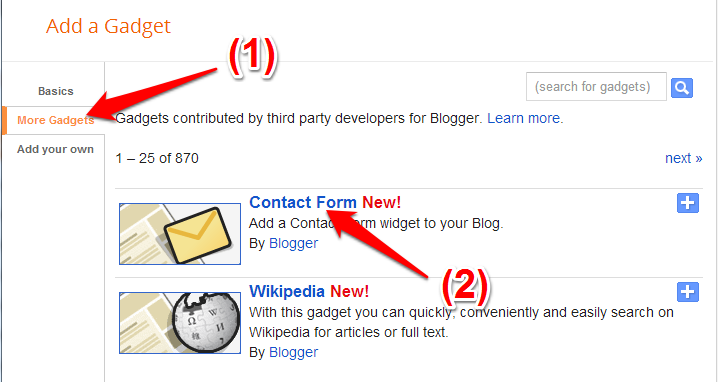
2.Click on the Add a Gadget Link and select More from the left Menu. You can add the add the brand new contact form the right side list
add-contact-form-in-blogger

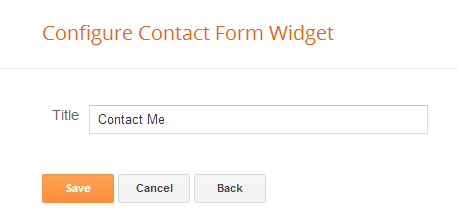
Add any title which you would like. But would be great, if it tells what it is really about?
configure-blogger-contact-form

Now, click on save button. That's it.
The Contact Form added to your Blog’s sidebar.
The contact form has the below input fields
  1. Name – Name of the reader who is sending you a message
  2. Email – Email address of the reader who is sending you a message
  3. Message – The message which the reader wants to send to you.blogger-contact-form 
Above is the snapshot of the "Contact Form".

When the reader sends you a message via the contact form, you will receive it straight into your inbox. 
If you have any further queries on adding the contact form, do let us know and we will be happy to help.
Happy Blogging!

Check out: WordPress or Blogger. Who is the true Winner?
Check out: How to add J Query tool tip to Blogger?

Monday, July 15, 2013

How To Delete Yahoo Account Permanently-Easy Method(2013)

In this small, yet very important post you will be going to learn "How To Delete Yahoo Account Permanently-Easy Method(2013)"

Many E Mail domain providers mainly like GMail, Yahoo, Hotmail etc do have a simple and easier way to signup on their domain(Even a first time user can able to do it) . But, when a person wants to delete the accounts it's a tedious and much complex job(A good niche techie may get confused).

  The following steps are simple and easy. Watch the below video and go through the text.


Steps that are taken in above tutorial are following:
1. Go to http://mail.yahoo.com and login with your login details.


2. Now paste this address in your browser's address bar:
edit.yahoo.com/config/delete_user
and hit enter.


3. Now fill your password, enter the CAPTCHA and select "YES Terminate my account".

That's all. Congratulations!

I hope it helped you.

If you have doubts please leave your comments below.

Thursday, July 11, 2013

Nokia's Lumia 1020 packs a crazy 41-megapixel camera

nokia lumia 1020
The new Lumia 1020 has the potential be a photographer's smartphone dream.
Nokia finally has its true Windows Phone successor: the Lumia 1020, which packs a 41-megapixel PureView camera.
Despite the extra camera power, the phone looks and feels thinner than the too-bulky Lumia 920.The sensor and camera lens protrude from the back in noticeable fashion, but not so much that the phone becomes unpocketable.

The Lumia 1020 has a 4.5-inch screen and a 1280 x 768 resolution, 2 gigabytes of RAM, and a dual-core Qualcomm Snapdragon S4 chipset. Aside from doubling the RAM, it's basically the same as Nokia's previous Lumia phones.
The 41-megapixel sensor isn't there to provide some insane bump in image quality, and you're not meant to handle 41-megapixel images. Instead, it's meant to replace the zoom function found in most point-and-shoot cameras.
With smartphones, trying to capture an object off in the distance usually means settling for a speck-sized representation of that object in the frame or using digital zoom, which adds blurriness and graininess. Nokia's 41-megapixel PureView technology uses those extra pixels to capture details you can't even make out with your own eyes -- but when you zoom, you can later crop the photo and get what you want with little or no drop-off in image quality.
If you don't want to zoom, the PureView camera will use all that pixel power to "oversample" (meaning it will capture the same pixel area multiple times and combine the best parts of each one) and generate a 5-megapixel image with added clarity and detail. It's a noticeable boost in image quality, and applies to video as well.
To support this blinged-out camera, there will be apps from both Nokia and third-party developers. Nokia's excellent Pro Camera app allows full manual control over your images, with an intuitive interface that gives quick access to settings including exposure, ISO, shutter speed and white balance. Apps from Vyclone, Path, Snapcam, Panagraph, Hipstamatic will be newly available or updated to take full advantage of the camera.
Using the Lumia 1020's camera confirms that the zoom functionality has strong potential. In an area with full natural lighting -- or with the aid of the excellent xenon flash -- you can use the digital zoom to crop in tight on a subject five to 10 feet away with little noticeable image degradation.
But the real kicker come in the post-processing. If you choose to crop an image after the fact, Nokia uses a feature that it calls re-framing. Instead of letting you choose a section to zoom in on and deleting the rest of the photo, it will create a locked-in zoom setting for a photo, and leave it that way every time you view it -- but it won't delete the parts of the photo you can't see. If you decide you want to revisit the full photo later, you can simply tap a button and re-frame the shot.
Long story short: This has the potential be a photographer's smartphone dream.

Windows Phone 8.1 has yet to be released, and it will support a beefier processor than the dual-core Snapdragon Nokia is using here. While you won't notice the extra power in general use, a quad-core processor could come in handy for quicker processing of these PureView images. Nokia CEO Stephen Elop confirmed that Nokia will have a another major phone launch later this year.
What do you think? Please, leave your comments below. 

Thursday, July 4, 2013

Top 10 Blogs To Make You A Better Blogger-Must Read To Become a Blogging Icon

For every naive blogger or a master blogger it's always good to evolve by reading other blogs. No one can say they are a master blogger. Blogging is a place which evolves everyday. But, the following blogs have become like the silver bullets of hallmark of success. So, let's check who are these top 10 blogs which can help you achieve the zenith in blogging.


1. ProBlogger – Started by Darren Rowse in 2004, this top site offers advice on creating a successful blog, including blog design, writing content and SEO. The site also hosts a forum, workbooks and a jobs board for bloggers.
2. Copyblogger – Everything you need to know about creating content, copywriting, SEO and internet marketing. Check out their e-books, seminars and webinars.
3. Bloggingtips.com – This site aims to be a community for bloggers, writers and readers to connect. The team of writers offers blogging advice, guides and resources.
4. DailyBlogTips – Covers blogging basics, design, SEO and internet marketing. Check out useful sister site, DailyWritingTips for daily tips on grammar, spelling, punctuation and vocabulary. This is one of my favorite sites.
5. Basic Blog Tips – Ileane offers blogging tutorials, including podcasts and scores of YouTube videos.


6. For Bloggers by Bloggers – A roster of top, passionate bloggers offers advice on how to create, sustain and grow a blog.
7. Michelle Shaeffer – Michelle shares her experience – both good and bad – as a successful blogger. Her tag line, Building your visibility, voice and community online, says it all.
8. WPBeginner – If you’re using WordPress as the platform for your blog, this is a great resource. The blog provides tips, tricks, hacks, and other resources for the WordPress community. Check out bobwpand Lorelle on WordPress, also.
9. Moz.com – If you want to go beyond the basic WordPress installation and get advice on how to super-optimize your blog, check out Moz (formerly, SEOMoz).
10. Legal Bloggers – Though they occasionally offer blogging tips, this is less about that and more about lawyers blogging with passion. Three of my favorites are legal blogging veterans Kevin O’Keefe (Real Lawyers Have Blogs), Carolyn Elefant (MyShingle) and Lee Rosen (Divorce Discourse – don’t let the title fool you – this blog is all about practical, insightful advice on running and growing a law practice).
RELATED POSTS:
Check Out: Insert Facebook Like Button In Every Blogger Post

Please leave your comments below.