Showing posts with label money. Show all posts

Sunday, June 30, 2013

How to Create Adsense account?- Easy Way

In this post, we will see how you can create adsense account for your Website. There are many Adsense alternatives, but no matter what network you try Adsense is certainly the best. Though, if you are good with marketing, you can look into Affiliate marketing and my post on Affiliate or Adsense will give you my personal insight.


I remember when I started Blogging, Adsense was something an alien word for me. While signing up for Adsense, I had very less idea about it, which I learned by myself online. For beginners, who are not aware of Adsense:  It’s  an advertisement program for publisher started by Google. They place contextual ads on your blog and you will get paid when someone clicks on ads.
Here I’m compiling a basic guide for beginners who are not sure of, how to apply for  Adsense.
Create Adsense account
There are few requirements which you need to follow before you can apply for Adsense. You need to have a website. You should be above 18+, else apply using your parents name.

Steps to create Adsense account:

Adsense has changed the account approval process lately and here is new adsense account approval process:
  • Sign up for Adsense
  • Add Adsense ads into your Blog
  • Your account will be reviewed and rejected.
  • Though new adsense account approval process is quite lengthy and now it’s 2 way adsense account approval process, but it will help us to maintain the quality of adsense. Also before applying for adsense make sure your website is following adsense policies.

I believe, by now you have done your research on the above and here is how  you can sign up for Adsense.

Step by Step guide to Create Adsense account

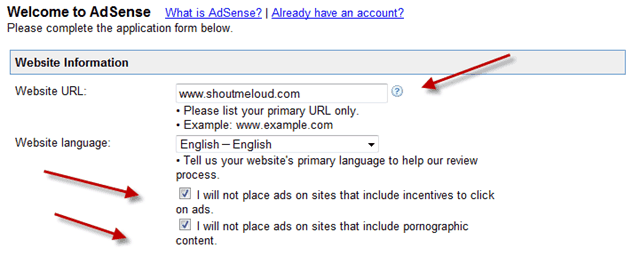
Website details:
Website-details

Add your website details, language and put a tick mark on first two box which says

  • I will not place ads on sites that include incentives to click on ads.
  • I will not place ads on sites that include pornographic content.
In Website URL, it should be your blog address and make sure to add it without http://

Adsense contact information:
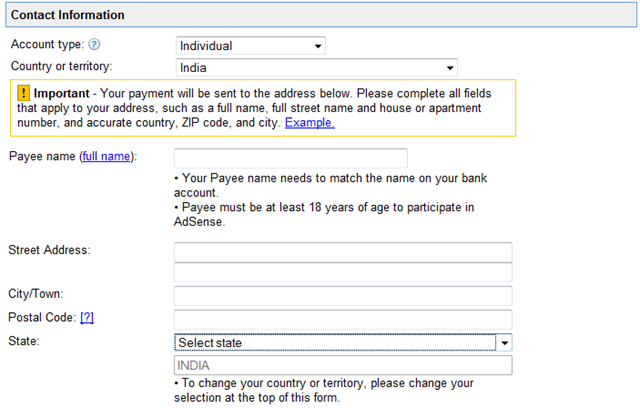
adsense-contact-information

This is most important part and I remember making couple of mistakes while signing up. Most important is Payee name. Make sure to use the same name under which you have a bank account. As Adsense will be sending you a check under that name. If you make a mistake here, changing payee name of your account would be difficult.

Rest add your contact information and fill other details.

Accept Adsense policies:

adsense-policies

Read Adsense policies and put a tick mark in front of all three boxes.
Once done click on Submit and on the next page, you can review your details. Make sure that all the details are accurate and up to date.

Signing up Email:
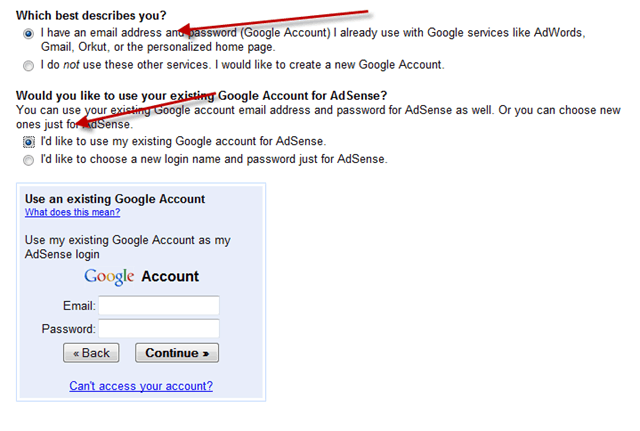
Adsense-Email-address

You can use your current Email address to sign up or you can create a new Gmail id for Adsense. For fast approval, I would suggest you to sign up using your Google apps address. i.e admin@domain.com.

In my case, While I tried signing up using generic @gmail address, I was rejected 4 times, but later on when I applied using domain Email address, it worked and I got Instant adsense approval.

Submit Adsense Tax Information

Once you have signed up for Adsense, you need to add adsense codes into your blog. Adsense team will review your application again after adding the ad codes, and it will activate and will send you Adsense Pin. Which takes 1-2 months depending upon geographical position.
So, after every thing is set up, in order to get paid from Adsense, you need to fill two information:
  • Please submit your Tax information
  • Please Enter your Pin
You will also need to submit Tax form, depending how you are entitled to do business.

Indian Publisher Tax Info Adsense
Similarly, once you receive the Pin, add it into your Adsense account and from the next month payment cycle, you will start getting paid. Minimum Payout for Adsense is $100.


I hope this guide will help you to create Adsense account. 
Leave your comments below.

Check Out: Top 10 Abandoned Places On The Earth

Friday, March 8, 2013

Make Money With YouTube Revenue Sharing Program

Every website adopts a monetization avenue such as advertising to earn revenue. We find banners promoting brands placed along the sides, top and bottom in a website. YouTube, originally a video sharing website, also has a monetization method called the revenue sharing program.


This video website competes with Facebook for the amounts of time people spend watching videos on YouTube daily. On YouTube people explore, watch and share original videos, acquire rates, comments and respond to videos with a respond video. If you are Youtuber, use the revenue sharing program to earn money from your own videos.


Revenue Sharing Program

The revenue sharing program comes as an incentive to Youtubers who have a lot to share with world through videos. To be a part of the program you need a Google Adsense account and an invite from YouTube to enable revenue sharing for that video. YouTube shall approach you when your video is an original video (not a copyrighted one!), has video copyrights and distribution rights to display and has valid views. By valid views I mean good traffic and subscription to your video. I guess nobody is able to figure out the exact view count as yet, probably a view count of 1000 will definitely get you an invite from YouTube to join the program. You would also need to tell about your video for an approval.
YouTube - Revenue Sharing
Once you have joined the program, ads will placed will be on the right side of your YouTube video box or sometimes at the bottom on the video player. When people click the ad to see it, you get paid into your Adsense account. Just a click on the ad is required for you earn! YouTube and the advertisers pay for promoting their brands to your friends. A separate menu in your YouTube account called the revenue share videos shall have all your earning videos. If you are able to earn from two or three videos, you’ll have the option to monetize almost every video you upload on YouTube. Videos with ads bring along curious subscribers apart from some money.

Youtube Monetization

YouTube considers monetization options for popular videos which are not a part of the program to expand the reach of the site’s program. So any Youtuber’s viral video gets a chance of being a revenue share video.
  • Upload HD videos to attract more views. HD videos deliver clarity with respect to picture and sound. People would like to stay on the video and not leave easily.
  • A catchy video title helps you get more people to view your video.
  • Above all creating a good quality content contributes to the success of a video.
YouTube - Revenue Share Videos
Although the revenue sharing program appears to be an easy way to earn money, as a Youtuber you also need to know:
  • You don’t choose ads for your videos so you might get ads of companies which are not your preference.
  • You can’t expect huge earnings from this program. Even earning $100 would take a long time.
  • Video ads are sometimes too disturbing. Your subscribers have to close them to watch the video. [Learn how to increase YouTube Channel Subscribers]
  • Your video has to be original and make sure you own the rights to all the video content. There are chances of rejecting based on copyright infringement.
A lot many profitable ways are available to make money on this video website. YouTube’s revenue sharing program although a slow pace money machine gives an opportunity to work towards sharing good video with world.

If you have any doubts or suggestions, please do leave your comments below.